How to Print Checks at Home Safely: A Step-by-Step Guide
By Sarah Mitchell · Published · 6 min read
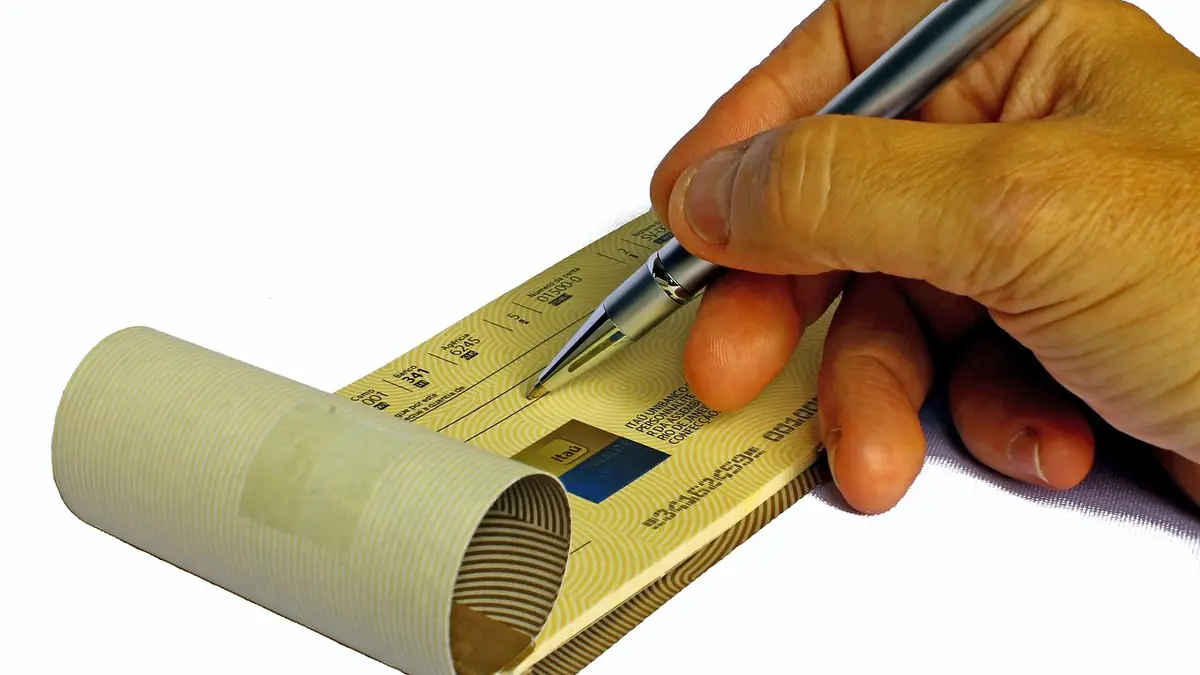
Printing your own checks at home can save money and add convenience, but it also comes with security risks. From choosing the right printer to handling MICR ink and preventing fraud, there are several factors to consider before you start.
This guide walks you through the process step by step, highlighting the equipment you need, the security measures to take, and the common pitfalls to avoid. Whether you're a small business owner or an individual tired of ordering expensive checks, you'll find practical advice to print checks safely.
Why Print Checks at Home?
Home check printing offers cost savings and flexibility. A box of 250 pre-printed checks from a bank can cost $20–$40, while blank check paper and toner for the same quantity might cost $10–$20. You also gain the ability to print on demand, avoiding the hassle of reordering and waiting for delivery.
However, DIY check printing requires attention to security and compliance. Checks must include specific features like MICR (Magnetic Ink Character Recognition) encoding to be processed by banks. You'll need the right printer and ink, plus a secure workflow to prevent unauthorized use.
For small businesses, printing checks in-house can streamline accounts payable. But it's essential to understand your bank's requirements and the legal guidelines for check production. Always verify that your printed checks meet industry standards to avoid rejection or delays.
- Cost savings: up to 50% compared to bank-ordered checks
- Print on demand: no more waiting for check orders
- Customization: add your logo and branding
- Control: manage check numbers and security features
Choosing the Right Printer for Check Printing
Not all printers are suitable for check printing. You need a printer that can handle MICR toner or ink, which contains iron oxide particles that allow the bank's reader to process the check. Laser printers are generally preferred because MICR toner is more widely available and produces sharper, more durable characters.
When selecting a printer, consider its paper handling capabilities. Check paper is typically 24–28 lb bond, slightly heavier than standard copy paper. Ensure your printer can feed this without jamming. Also, look for a straight-through paper path to avoid bending or smudging the checks.
If you're printing checks as part of a broader home office setup, you might want a multifunction printer that can also scan and copy. Just make sure it supports MICR toner. For high-volume needs, a dedicated MICR printer might be worth the investment, but for occasional printing, a compatible laser printer works fine. For general printer selection advice, see our guide on how to choose a printer for home office use.
- Laser printers: best for MICR toner compatibility and sharp text
- Inkjet printers: possible but MICR ink is less common and may smudge
- Paper handling: supports 24–28 lb check paper
- Straight-through path: reduces jams and smearing
- MICR toner: must be specifically designed for check printing
| Factor | Home Printing | Bank-Ordered Checks |
|---|---|---|
| Cost per check (excluding printer) | $0.08–$0.15 | $0.08–$0.16 |
| Minimum order quantity | 1 check (on demand) | Typically 250 checks |
| Turnaround time | Immediate | 3–10 business days |
| Customization | Full control (logo, design) | Limited to bank options |
| Security responsibility | You | Bank/vendor |
| MICR compatibility | Requires MICR toner/ink | Guaranteed |
Understanding MICR Ink and Toner
MICR stands for Magnetic Ink Character Recognition. The numbers at the bottom of a check (routing, account, and check number) are printed in a special font using magnetic ink. This allows banks to process checks quickly and securely. If you print checks with regular ink, they may be rejected or delayed.
MICR toner is available for many laser printers, but you must verify compatibility with your model. Prices vary: a MICR toner cartridge can cost $80–$150, which is more than standard toner. However, one cartridge can print hundreds of checks, so the cost per check is still low.
For inkjet printers, MICR ink is available but less common. It can be messier and may not produce the crisp characters required. If you go the inkjet route, test a few checks with your bank before committing. Always store MICR supplies securely to prevent misuse.
- MICR toner: contains iron oxide for magnetic readability
- Compatibility: check your printer model's support
- Cost: $80–$150 per cartridge, yields 500–1,500 checks
- Security: store MICR toner in a locked cabinet
Step-by-Step: Printing Checks Safely
Start by ordering blank check paper with security features. Look for paper with watermarks, security threads, and microprinting. These features are not easily replicated and help prevent fraud. You can buy check paper from office supply stores or specialized vendors.
Next, set up your printer according to the manufacturer's instructions for check printing. This may involve adjusting the paper type and print quality. Use the check printing software provided by your bank or a reputable check printing program. These programs ensure proper formatting and MICR encoding.
Before printing a batch, do a test print on a blank sheet to check alignment. Then print a single check and verify it with your bank if possible. Once confirmed, print your checks in small batches and store them securely. Always log check numbers to track usage and reconcile with your bank statement.
Finally, dispose of waste securely. Shred any misprinted checks and keep MICR toner away from unauthorized users. Consider using a locked drawer for blank check stock and printed checks. For additional security, you can use check printing software that requires a password.
- Order security check paper with watermarks and threads
- Use bank-approved check printing software
- Test alignment on plain paper first
- Print in small batches and log check numbers
- Shred misprints and store checks securely
Fraud Prevention and Security Tips
Check fraud is a real risk, but you can mitigate it. Use positive pay with your bank, where you provide a list of issued checks. The bank then verifies each check presented for payment. This service often costs a small monthly fee but can save you from significant losses.
Never leave printed checks or blank check stock lying around. Store them in a locked cabinet or safe. Restrict access to your check printing supplies, including MICR toner and check paper. If you have employees, conduct background checks and limit who can print checks.
Monitor your bank account regularly for unauthorized checks. Sign up for alerts for large transactions. If you suspect fraud, report it immediately to your bank and local authorities. Keep records of all checks printed, including voided ones, for at least seven years.
- Enroll in positive pay with your bank
- Lock up check stock and MICR supplies
- Limit access to authorized personnel only
- Reconcile bank statements promptly
- Report suspicious activity immediately
Legal and Bank Requirements
Banks have specific requirements for checks to be processed. These include the size and placement of the MICR line, the check number, and security features. The American National Standards Institute (ANSI) sets standards for check design. Your bank may also have additional rules.
Before you start printing your own checks, check with your bank. Some banks require you to use their approved vendors or may charge fees for processing homemade checks. They may also require you to sign an agreement accepting responsibility for fraud.
Businesses should also consider legal requirements for record-keeping. The IRS recommends keeping check records for at least three years, but seven years is safer. Ensure your check printing software maintains a log of all checks printed, including voided ones.
- Follow ANSI standards for check layout and MICR line
- Check your bank's policy on self-printed checks
- Keep records for at least seven years
- Use check printing software with audit trails
Cost Comparison: Home Printing vs. Bank Checks
The cost of printing checks at home includes paper, toner, and software. A box of 500 blank check sheets with security features costs $30–$50. MICR toner costs $80–$150 and prints about 1,000 checks, so $0.08–$0.15 per check. Check printing software might be free or cost $30–$100 one-time.
In contrast, bank-ordered checks cost $20–$40 for 250 checks, or $0.08–$0.16 per check. However, you also pay for shipping and may have to wait. The savings from home printing come with volume; for occasional use, bank checks might be simpler.
Don't forget the printer cost. If you need a new printer, a compatible laser printer costs $100–$300. But if you already have one, the marginal cost is low. For businesses printing hundreds of checks monthly, home printing can be significantly cheaper and more convenient.
- Blank check paper: $30–$50 per 500 sheets
- MICR toner: $80–$150 per cartridge, yields ~1,000 checks
- Software: free to $100 one-time
- Bank checks: $20–$40 per 250 checks plus shipping
- Use a laser printer with MICR toner for reliable check printing.
- Always test alignment and verify with your bank before printing batches.
- Secure check stock and MICR supplies to prevent fraud.
- Consider positive pay and keep thorough records for at least seven years.
Sarah has spent over a decade testing and reviewing printers for homes and small businesses. She focuses on practical buying advice, cost analysis, and helping readers avoid common printing pitfalls. Her experience spans inkjet, laser, and specialty printers.