Large Format 3D Printers for Architects: A Selection Guide
By Sarah Mitchell · Published · Updated · 5 min read
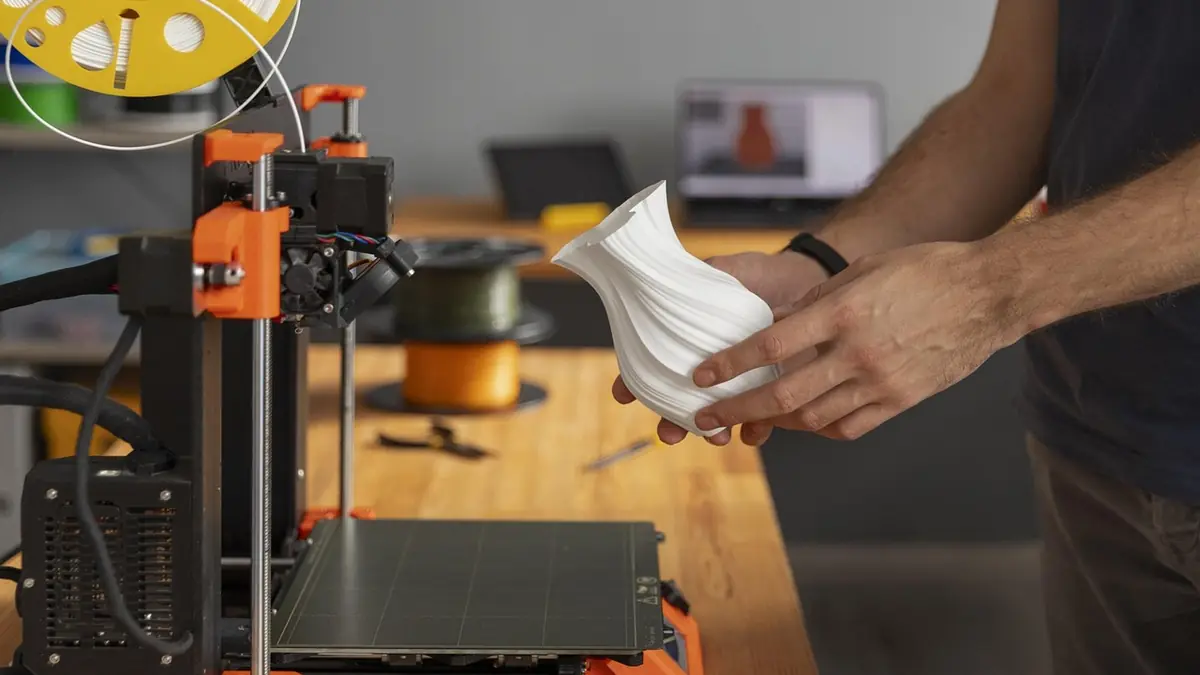
Architectural models have moved from foam core and basswood to filament and resin. A large format 3D printer lets you produce site massing models, facade studies, and sectional prototypes in-house, often overnight. But the wrong machine wastes money on failed prints, warped slabs, and a build volume that is always just too small.
This guide focuses on what matters for architectural work: how big the build volume really needs to be, which materials hold detail without warping, and where precision pays off versus where it is overkill. You will find typical ranges, a comparison table, and hard-won advice on matching a printer to the way architects actually design.
Build Volume: The First Decision
Architectural models rarely fit on a 200 x 200 mm bed. A typical massing model at 1:200 for a 50 m building is 250 mm long, and a site context model can easily exceed 400 mm in one dimension. Most architects are best served by a build volume of at least 300 x 300 x 300 mm; 400 x 400 x 400 mm or larger gives room for sectional models and multi-building blocks.
Bigger is not always better. Large gantry-style printers take up significant floor space, need sturdier benches, and can be slower to heat. If your models are consistently small, a 250 mm cube printer with a high-flow hotend will produce better detail faster. Consider how often you print full-site models versus facade fragments. For many practices, a 350 mm cube is the practical sweet spot.
Also check the maximum part height. Sectional models often need 300 mm or more in Z. And confirm that the bed is actually heated across its full area; a cheap large bed with uneven heating will cause corners to lift on big flat bases.
- 300 x 300 x 300 mm: minimum for most 1:200 massing models
- 400 x 400 x 400 mm: comfortable for site context and multi-block models
- Check Z height separately; sections often need 300 mm+
- Confirm even bed heating across the full plate
Materials That Work for Architecture
PLA remains the default for study models: cheap, dimensionally stable, and easy to sand. Matte PLA hides layer lines better than glossy. For models that need to survive handling and sun exposure, PETG offers better toughness and UV resistance, though it strings more and needs slower speeds. ABS and ASA are less common because warping on large flat bases is severe without an enclosed, heated chamber.
For fine detail such as facade mullions or stair treads, resin printers deliver far better resolution, but large format resin is expensive and messy. A practical combination is a large FDM printer for massing and a small resin printer for detail inserts. Specialty filaments like wood-fill or stone-fill can mimic material studies, but they wear nozzles faster and need wider nozzles (0.6 mm or more).
If you print presentation models, consider a dual-extruder machine for soluble supports. On large architectural overhangs, breakaway supports can mar surfaces; dissolvable supports save hours of cleanup.
- PLA: best all-round for study models, low warp, easy to sand
- PETG: tougher and more UV-stable, but stringier
- ABS/ASA: only with a heated chamber to control warping
- Wood-fill and stone-fill: need 0.6 mm+ nozzles and accept faster wear
Precision and Layer Resolution: How Much Do You Need?
Architectural models are judged at arm's length, not under a microscope. A layer height of 0.2 mm is fine for massing; 0.1 to 0.15 mm is typical for presentation models where layer lines are visible. Below 0.1 mm, print times climb steeply and the benefit is marginal on FDM. Positional accuracy matters more than layer height: look for repeatable accuracy in the 0.1 to 0.2 mm range and a properly tensioned motion system.
Nozzle diameter is the overlooked precision factor. A 0.4 mm nozzle gives a good balance; a 0.6 mm nozzle prints large flat walls twice as fast with minimal loss of perceived detail. Many architects keep a 0.4 mm for fine facades and swap to 0.8 mm for site models. Auto bed leveling and a rigid frame matter more than exotic features for consistent large prints.
- 0.2 mm layers: fine for massing and block studies
- 0.1–0.15 mm: presentation models with visible detail
- 0.4 mm nozzle: detail; 0.6–0.8 mm: speed on large walls
- Auto bed leveling and a rigid frame beat marketing claims
Enclosure, Environment, and Print Reliability
Large prints fail for boring reasons: drafts, uneven cooling, and poor adhesion. An enclosure is not just for ABS; it stabilizes chamber temperature on long PLA prints and keeps dust off. For big flat bases, a heated bed that reaches 100–110 °C is useful for PETG and ASA, while 60 °C is enough for PLA.
Consider where the printer will live. A 400 mm printer in a busy studio needs a stable table and ideally a dedicated room with less foot traffic. Noise levels vary widely; some large printers exceed 55 dB, which is noticeable in an open office. Filament storage also matters: PLA absorbs moisture and prints poorly after a few weeks in humid air, so a dry box is a worthwhile add-on.
Software, Workflow, and File Preparation
Architects work in Rhino, Revit, SketchUp, and ArchiCAD. Most slicers accept STL and 3MF, but large models need careful splitting. A good slicer lets you cut a model into interlocking parts, add alignment pins, and orient parts to minimize supports. Check that the printer's firmware supports resume-after-power-loss; a 30-hour model print is a real risk in a studio.
Network connectivity is more useful than it sounds. Sending a job from your desk to a printer in the model shop, with a camera feed, saves trips. Some printers support remote monitoring and print queues, which matters if several people share one machine. Budget time for learning the slicer; poor orientation and support settings cause more failures than hardware.
- Slicer must handle model splitting and alignment pins
- Resume-after-power-loss is essential for 20+ hour prints
- Network and camera monitoring help shared studio use
- Train at least two people on slicing and maintenance
| Build volume (mm) | Typical price range | Best for | Layer resolution | Enclosure |
|---|---|---|---|---|
| 300 x 300 x 300 | $800–$1,800 | Small practice, massing models | 0.1–0.3 mm | Optional |
| 350 x 350 x 350 | $1,500–$3,000 | Most architects, facade studies | 0.1–0.25 mm | Recommended |
| 400 x 400 x 400 | $2,500–$5,000 | Site context, sectional models | 0.1–0.2 mm | Yes |
| 500 x 500 x 500 | $4,000–$8,000 | Dedicated model shops, large sites | 0.1–0.2 mm | Yes |
| Dual extrusion 300–400 | $2,000–$6,000 | Soluble supports, presentation models | 0.1–0.2 mm | Yes |
Cost, Space, and Total Ownership
Large format FDM printers typically range from about $800 for a basic 300 mm kit to $4,000–$8,000 for a well-built 400–500 mm machine with enclosure and dual extrusion. Resin printers large enough for architecture are rare and cost more per print in consumables. The printer is only part of the cost: expect to spend 10–20% of the purchase price annually on filament, nozzles, and maintenance.
Space and power also count. A large printer may need a bench 800 mm deep and 1,000 mm wide, plus clearance for the bed to move. Power draw during printing is modest (200–400 W), but heating a large bed can peak higher. If you also produce 2D drawings, compare the total cost per page of your office printing versus 3D model output; both add up quietly. For practices also buying plotters, our guide to A1 plotter printers and real cost per page is useful context.
Matching the Printer to Your Practice
A small practice printing a few models a month should prioritize reliability and a 300–350 mm build volume over speed. A larger studio with a dedicated model shop can justify a 400–500 mm machine with dual extrusion and an enclosure, plus a small resin printer for detail. If you also outsource large-format 2D printing, see what to look for in a large format printer for architects to keep your 2D and 3D workflows consistent.
Try before you buy if possible. Ask for a test print of a flat 200 mm square; warping and poor first-layer adhesion show up immediately. Check spare parts availability and whether the manufacturer supports your region. A printer with a strong community and published maintenance guides will last longer in a studio than a cheaper machine with no support.
- A 300–350 mm build cube covers most architectural models; go larger only for site context or sections.
- PLA and PETG handle most needs; enclosure matters for reliability on long prints.
- Nozzle diameter and orientation affect speed and detail more than exotic layer heights.
- Budget 10–20% of printer cost per year for consumables and maintenance.
Sarah has spent over a decade testing and reviewing printers for homes and small businesses. She focuses on practical buying advice, cost analysis, and helping readers avoid common printing pitfalls. Her experience spans inkjet, laser, and specialty printers.